• Skip to Navigation
  • Skip to Main Content
  • Skip to Secondary Content (right column)
  • Skip to search
Wiser Usability.  An Age of Experience.

Wiser Usability

An Age of Experience
  • Home
  • Services
  • Resources
  • Blog
    • Portfolio
    • Reviews
    • Design
    • Usability
    • Current Events
  • About
  • Contact
Resize Text: A A A
  • Wiser Usability An age of experience
  • How inclusive is your website? Is it easily usable by anyone over, say, 40?
  • Client Testimonial Excerpts What our clients say about Wiser Usability
  • Usability vs. Accessibility vs. Design What's the difference?
  • By the Numbers  
  • Upcoming & Recent Presentations  

Wiser Usability: An Age of Experience

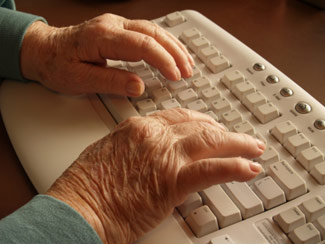
Seniors hands typing at keyboardGuidelines for designing “age-friendly” websites have been published by AARP, the National Institute on Aging, the World Wide Web Consortium, among others. However, very few web developers follow such guidelines, even when older adults are their intended audience. As we age, we are likely to experience:

  • lower contrast sensitivity and color perception, making links harder to identify.
  • reduced dexterity and fine motor control, making small targets such as buttons and links harder to select.
  • increased tendency to be visually distracted, making navigation more difficult.
  • greater difficulty concentrating, making navigation and learning more difficult.

In the future, even non-governmental institutions will need to comply with Section 508 of the Rehabilitation Act: websites must be accessible to users with certain limitations, including those associated with aging.

To make sure that you’re optimizing the web experience for your audience, let Wiser Usability evaluate your website.

Learn how we can help you broaden your customer-base

Is it easily usable by anyone over, say, 40?

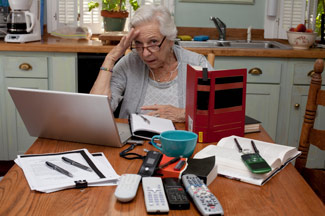
Senior frustrated by technologyCommon age-related changes affect our vision, hearing, fine motor control, and cognition. Visual changes, for example, start at about age 40; by age 50, most of us experience them.

Does the design of your website take this into account? With the shifting age demographic and the massive increase in the number of internet users over 40, you don’t want to ignore this audience.

Formal guidelines for website accessibility exist, but in practice, few website designers use them.

Make sure you’re giving your intended audience the best user experience possible. Let Wiser Usability show you how.

Learn more about our services

What people say about Wiser Usability

“Kate has been a valuable advisor for Carenga. She came in half-way through our product design and pointed to several key accessibility features which we had overlooked. Thanks to her input, we have been able to deliver a final product that is pleasing and easy to navigate for older adults. In the future, our plan is to bring Kate early on in our design process.” -Marguerite Manteau-Rao, Founder, Carenga


“As the founder of a start up serving the senior demographic, I am extremely lucky to have met Kate Finn. Not only did she provide valuable industry insights and networking opportunities, but her evaluation of our company website is an indispensable resource. She identified issues that would have otherwise been overlooked and will ultimately make our website much easier to use for our customers.” — Michael Potteiger, Founder, Generation Connect


“Thanks also for your assessment and feedback on the Partners In Care website…your guidance has been invaluable to me…I’ve truly experienced how difficult it is to navigate the site; and, I know what I am looking for…This is more evidence that a future website re-design will need to be responsive and have text re-sizing capabilities. In addition to our conversations, the resources you pointed me to on the WiserUsability website have been really helpful. When I am perusing other sites, I frequently observe structure and content that reflects the best practices you have shared with me.” - Barb Cooke, Partners In Care, Maryland

Continue reading


“I really enjoyed the talk and found it to be quite informative. It will definitely impact the approach my team takes when developing our interactive platform for older adults.” (in reference to presentation, “How to Make Your Website Age Friendly,” ASA 2013). — Deirdre Amola, Co-Founder, Serenity Sender


“I am more than satisfied with the way our whole website now looks cleaner and more consistent — advantages that came along with the work you did to upgrade accessibility for those who visit our site. … Thanks to Wiser Usability, not only is our website more accessible, but you have presented options to us for further improvements.” — Tom Rickert, Executive Director, Access Exchange International

Continue reading


“Wiser Usability reviewed our website, pointing out simple improvements that make the site more accessible and usable for seniors and people with disabilities. Their suggestions made sense to us and can be implemented in stages, making it easy to better serve an important part of our customer base.” — Eric Whittington, Bird and Beckett Books and Records

Learn how we can help your organization

Usability vs. Accessibility vs. Design

Even among User Interface wonks, there’s not exactly universal agreement on the meaning of these terms. For the purpose of creating a common understanding, let’s define them as:

  • Usability: How easy it is for the intended users to successfully use a website or application for its intended purpose. Usability is often measured in terms of task completion time, success rate, need for help, or users’ satisfaction or frustration. Usability depends on design and accessibility: highly usable products and services are those that are well designed and accessible to a wide audience.
  • Accessibility: How easy it is for everyone — even people with perceptual and physical disabilities — to access and experience the content of a website or application. Making websites and software applications accessible requires providing text alternatives for pictures, captions for audio content, navigation aids, and larger “target” areas for those with impaired motor control, among other things.
  • Design: People often use this term to refer only to visual aesthetic appeal, but in fact “design” covers many different aspects of a website or software product besides visual appeal, including how well it fits the tasks and goals of the intended users, and its complexity or simplicity (as measured in how much users must remember to use it effectively).

You can design a website that’s visually stunning but that doesn’t fit users’ tasks well or that people can’t access or use effectively or efficiently. Or you can design a site that’s very functional, usable, and accessible, but ugly to look at.

However, the ideal website is highly usable, universally accessible, and designed for efficient use and aesthetic appeal.

Learn how we can help you move your website toward the ideal

Who is most affected by unusable, inaccessible, or poorly-designed websites?

  • People with low literacy.
  • People who are non-native speakers of target language.
  • People with little technical expertise.
  • People with impaired vision, hearing, speech, motor control, or cognitive processing.

Changes in vision, hearing, motor control, and cognition are highly correlated with aging, and a large percentage of older adults are affected in one or more of these areas.

Who is considered “older”?

  • Age at which people begin to show signs of decreased function (memory, reasoning, etc.): 45 [British Medical Journal, January 2012]

How many older people are we talking about?

  • Number turning 65 years old every day (from 2011-2030): 10,000
  • Percent of population that will be 65+ in 2020: 18
  • Percent of population that will be 45+ in 2020: 41
  • Increase in population over 65 (2010-2020): 14,000,000
  • Increase in population over 45 (2010-2020): 17,000,000

How many people of any age can be considered impaired? (US only)

  • Difficulty having their speech understood: 2,500,000
  • Difficulty grasping objects (correlates with ability to use a mouse, trackpad, and keyboard): 7,100,000
  • Difficulty seeing the words and letters in ordinary newsprint, even with corrective lenses:7,800,000
  • Difficulty hearing a normal conversation, even with a hearing aid: 7,800,000

What % of adults 18+ go online? (US only)

  • 18-29: 98
  • 30-49: 92
  • 50-64: 83
  • 65+: 56
  • Adults (18+) who don’t go online: 15
Let us help you tune your website for your users

Upcoming

  • How to Make Sure Your Website Is Usable, Tue March 11, 2014, 2:30-3:30 pm PDT, ASA Aging in America Conference, San Diego, CA.
  • Introducing iPads to Older Adults, Fri March 14, 2014, 11:00 am - 12:00 pm PDT, ASA Aging in America Conference, San Diego, CA.
  • Lifelong Learning for Active Older Adults, Fri April 18, 2014, 10 - 11 am, Northwest YMCA, Cupertino, CA.

Recent

  • Designing for Older Adults: Usability Considerations for Real People, January 10, 2014, Computer Science Department, Stanford University. [View Video]

Previous

  • A Usability Study of Websites for Older Travelers, July 24, Human-Computer-Interaction International 2013 conference (HCII 2013), Las Vegas, NV.
  • Making Web Sites More Age-Friendly, June 11, BayCHI, Palo Alto, CA.
Let us apply our expertise to your website.

Search the site

  • Home
  • Services
  • Resources
  • Blog
    • Portfolio
    • Reviews
    • Design
    • Usability
    • Current Events
  • About
  • Contact
© 2013 Wiser Usability
SiteLock Website Security